How Returning Students Can Use AI Without Risking Their Degree or Their Health
Integrity rules, study workflows, and coping habits for working adults finishing a degree

Key Points
- Get AI permissions in writing, since each course sets its own rules.
- Detectors wrongly flagged 61.22 percent of non-native speakers' essays (Stanford, 2023).
- Some adult learners in a 2026 Ghana study reported AI-disrupted sleep.
Returning to College in the AI Era: What You Need to Know First
No adult learner needs a lecture on AI's convenience. The difficulty is that the time savings now arrive with course-by-course rules and a documented personal cost. In a November 2026 Scientific Reports study of 212 adult learners, digital well-being averaged 4.58 on a 7-point scale, yet a notable minority reported disturbed sleep, changed eating habits, and less exercise.
Three habits separate a useful tool from an integrity case: read the syllabus closely, know which assignments tolerate AI, and keep a written record of what your instructor approved. The same efficiency can protect a degree or put it at risk.
What Adult Learners Actually Use AI for (and How They Differ From 18-Year-Olds)
Colleges are still writing their generative AI rules while students, adult learners especially, have already folded the tools into daily routines. The tools are familiar: ChatGPT, Gemini and Copilot for explaining concepts and drafting outlines, Grammarly for editing, and translation apps for readers working in a second language. For someone studying after a shift or once the kids are asleep, the appeal is time. A tool that summarizes a dense chapter at 10 p.m. fills a real gap.
What the Surveys Show
A University of Phoenix study, published June 30, 2026, surveyed 491 nontraditional undergraduates in online general-education courses. About 43.2% (212 students) said they used generative AI in coursework.1 Their worries were accuracy, originality, keeping their own academic voice, and how integrity policies applied to them. Two caveats matter here. It is one online university, and the data are self-reported and correlational. Higher GPAs and tech confidence were associated with more frequent use, but that does not show AI improved anyone's grades.
Inside Higher Ed's 2024 Student Voice survey of 5,025 undergraduates found 31% unsure when or how generative AI was allowed. Only 16% knew because their college had published an appropriate-use policy. More than a third of respondents were post-traditional (two-year enrollment or age 25+), but those figures are not broken out by age, so they cannot be treated as an adult-only rate.
How Many Students Cheat With AI?
A Science analysis in May 2026 of more than 95,000 students at 20 U.S. public research universities found about one-third used generative AI regularly to produce text, video or code for assignments, and 9% used it to cheat.2 The sources do not say exactly how cheating was defined. Nor do they give a comparable national share of students admitting they used AI to write papers, so treat any such number with suspicion.
Where Adults Differ
Published data on age differences is thin, so these contrasts are patterns rather than measured gaps:
- Time pressure: Work and caregiving leave less room for slow drafting, which raises the pull toward shortcuts.
- Rule uncertainty: Adults returning after years away may not know how policies have changed.
- Workplace experience: Many already use AI at work, so the line between professional and academic use can blur.
- GenAI Use in Online Adult LearnersPhys.org
- Widespread AI Misuse Means Higher Ed Must Rethink AssessmentCornell University
How to Read a Professor's AI Policy, Even When It's Vague
A professor's AI policy is a course's own answer to three questions: whether you may use generative AI at all, on which assignments, and what you must disclose afterward. There is no single nationwide standard. Wording, citation style, and required records vary by instructor, department, and institution, so the tool that is fine in one course can be misconduct in the next.
Step 1: Look in Three Places
Read the syllabus, the assignment sheet, and the learning management system announcements. Check for a revised version posted after the term started. If the syllabus points to a department or teaching center page, open that too, because the course rule may sit one click away.
Step 2: Sort It Into a Tier
Most policies land in one of four buckets: prohibited outright, allowed only with prior instructor approval, allowed for defined assignments with disclosure or citation, or unrestricted with no special citation. Assignment-specific permission still draws a line. The University of Washington permits AI only in specified activities and treats other uses as academic misconduct,1 while UC Berkeley's sample policies allow AI for listed assignment types with citation and not for others.2
Step 3: Decode the Vague Words
"Assistance," "generative," and "unauthorized" carry the weight. Harvard permits AI for concept explanation and practice problems but prohibits it from producing, drafting, revising, solving, translating, or summarizing submitted work, including first drafts, and its policy may extend to built-in AI features in word processors, browsers, and code tools.4 The University of Chicago allows background reading, summarizing, brainstorming, and editing, with disclosure and APA citation.3 Cornell generally discourages generative AI yet permits it on select assignments with attribution.5 Stanford's guidance asks instructors to spell out when and how you must disclose AI use, and to keep prompts, transcripts, and AI artifacts, a sign of how much a cautious instructor expects you to be able to show.6
Step 4: Ask, Then Confirm
If the syllabus is silent, ask before you type. Silence is not permission. Keep the request specific:
"Professor [Last name], for the [assignment] I'd like to use [tool] to [specific use, such as brainstorming an outline from my own notes]. Is that allowed, and would you want it noted in a disclosure statement? Thank you, [Your name]."
Then close the loop in one line: "Thanks for confirming that [use] is fine for [assignment] without a disclosure note. I'll follow that for the rest of the term." Save the reply with the assignment.
- AI Course PoliciesUniversity of Washington Teaching Center
- Communicating Course Policies and Talking with StudentsUC Berkeley Teaching Center
- Guidance on Syllabus Statements for Use of AI ToolsUniversity of Chicago Teaching Center
- AI Syllabus PoliciesHarvard Bok Center
- AI and Academic IntegrityCornell Center for Teaching Innovation
- AI Course PoliciesStanford Center for Teaching and Learning
Allowed, Gray-Area, and Off-Limits: AI Use by Assignment Type
The principle behind every row is simple: AI can support your thinking, but it should not replace the skill the assignment is grading. Use this table as a starting point. Your instructor's written course policy always overrides it, so check the syllabus first and ask when an assignment isn't covered.
| Assignment Type | Usually Fine | Gray Area (Ask First) | Usually Off-Limits |
|---|---|---|---|
| Discussion posts | Clarifying a confusing reading, checking your grammar after you write, brainstorming questions to raise with classmates | Asking AI to suggest counterpoints you then respond to in your own words | Posting AI-generated replies as your own perspective or experience |
| Essays and research papers | Explaining a concept, outlining your own ideas, finding search terms to use in the library database | Having AI critique your draft's structure or flag weak arguments, paraphrasing help | Submitting AI-written paragraphs, letting AI generate sources or citations you have not verified |
| Exams and quizzes | Generating practice questions and flashcards before the exam, quizzing yourself on key terms | Using AI on open-book or take-home exams, even when notes are allowed | Any AI use during a closed-book, proctored, or timed exam unless the instructor explicitly permits it |
| Coding assignments | Explaining an error message, reviewing how a function or concept works in general | Asking AI to spot a bug in code you wrote, using AI autocomplete inside your editor | Pasting the assignment prompt into AI and submitting the code it returns |
| Lab reports | Reviewing how to format a lab report, explaining the scientific concept behind the experiment | Help organizing your results section or tightening your wording after drafting | Generating data, results, or analysis you did not produce, or writing your conclusions for you |
| Presentations | Brainstorming topic angles, rehearsing by having AI ask you practice questions | AI-generated images or slide designs (often allowed with a credit line) | Reading an AI-written script as your own analysis without disclosure |
Using AI to Rebuild Study Habits After Years Away
After years away, the temptation is to let AI do the heavy lifting, but the study habits you are rebuilding only take hold if you do the thinking yourself. The safest approach is to use AI as a tutor and scheduler, not a ghostwriter. Prompts that ask it to explain, quiz, or critique are far less risky than prompts that ask it to produce work you will be graded on.
Five Prompts to Copy and Adjust
- Weekly plan: "I work rotating shifts (list them) and handle school pickups at 3:15 on weekdays. I have two courses with these deadlines. Build a realistic weekly study plan in 30 to 45 minute blocks and leave one evening free."
- Math refresher: "Explain each step of solving this type of problem, but do not give the final answer. Stop after each step and ask me to try the next one."
- Writing feedback: "Here is my paragraph. Do not rewrite it. Point out unclear sentences and weak transitions, and ask me questions that would help me revise."
- Practice quiz: "Write five practice questions on supply and demand at an introductory college level. Wait for my answers before telling me whether I'm right."
- Your own notes: "Here are my lecture notes. Quiz me one question at a time using only this material, and tell me which topics I keep missing."
A Fact-Checking Routine
AI can sound confident while being wrong, and it sometimes invents sources that look real. Before you trust anything, run three checks:
- Compare each claim to your assigned readings and lecture materials.
- Search every citation in your library's databases. If you cannot find the article, author, or journal, treat it as invented.
- Ask your instructor or a librarian when the AI and your course materials disagree. The course materials win.
A 30-Minute Study Block
This workflow keeps the learning with you:
- Minutes 0 to 5: Skim the reading yourself and write three questions you expect it to answer.
- Minutes 5 to 20: Read or work problems on your own. Ask AI to clarify only the points that stall you.
- Minutes 20 to 28: Close the reading and write a summary from memory. Then paste your notes into the "quiz me" prompt.
- Minutes 28 to 30: Log what you missed so the next block starts there.
If AI is doing the reading, writing, or problem solving in this routine, you have drifted from studying into outsourcing, and that is where integrity problems begin.
Free vs. Paid AI Tools: Cost, Privacy Settings, and Accessibility Features
Most adult learners should start with a free tier, or the free year Google offers eligible U.S. college students, and pay only once a specific course need shows up, because prices, plan names, and privacy settings change often enough that you should confirm the details on each vendor's own page before signing up. Before you paste coursework or personal details into any chatbot, open its settings and look for activity, history, or model-improvement controls. If you have dyslexia, ADHD, hearing loss, or a language barrier, contact your school's disability services office, which can tell you which tools and accommodations are approved for your courses, since the vendor materials below do not itemize features like dictation, read-aloud, or live captions.
| Tool | Free Tier | Paid Tier / Student Discount | Data & Training Controls | Accessibility Features |
|---|---|---|---|---|
| ChatGPT | $0/month, with limited messages, limited file uploads, and limited image creation | No general U.S. student discount is listed. ChatGPT Edu is a lower-cost plan that universities buy for their campus, and ChatGPT for Teachers is free for verified U.S. K-12 educators through June 2027. | The Edu and Teachers plans include stronger security and privacy controls. The vendor materials reviewed do not spell out consumer training opt-out or retention settings, so check the data controls in your account settings. | Plus and Pro add voice, image tools, and data analysis. Dictation, read-aloud, live captions, and translation are not itemized. |
| Google Gemini | Eligible U.S. college students age 18 and older can get Google AI Pro at no charge for one year, including unlimited uploads of class materials, study notebooks, interactive visualizations, Gemini Live, 4x higher usage limits, and 5 TB of storage. | Renews at $19.99/month after the free year unless you cancel, so set a calendar reminder. | Turning off Keep Activity stops future chats from being reviewed to improve Google services. Chats already reviewed by human reviewers may be kept for up to three years, even after you delete them. | The student plan includes Gemini Live, interactive visualizations, and study tools. Dictation, read-aloud, live captions, and translation are not itemized. |
| Microsoft Copilot | Free tier with no ads, running GPT-5.2 and Microsoft's MAI models, according to a 2026 comparison review | N/A | On consumer tiers, conversations may be used to improve models by default. You can opt out in settings. Business tiers are recommended for sensitive material. | Not itemized in the materials reviewed. Check Microsoft's accessibility pages or ask disability services. |
Can You Get Caught? Detectors, Disclosure, and Documentation
You want AI's help without risking an accusation, but the detectors built to catch misuse are far less reliable than they look.
Detectors Are Shaky, Instructors Have Other Clues
Detector accuracy has no universal figure.2 Copyleaks claims 99.12%, but that is a vendor number, not an independent test.3 Turnitin has cited false positives under 1%, while a smaller Washington Post evaluation found 50%.3 Bloomberg reported roughly 1 to 2% for GPTZero and Copyleaks on essays written before generative AI.1 A 2026 analysis found seven popular detectors falsely flagged an average 61% of genuine TOEFL essays by non-native English speakers, yet another study of 160 genuine assignments found no false positives.4 Scores are probabilistic signals, not proof.
Instructors also notice sudden shifts in writing style and missing version history, and some follow up by asking you to explain your work aloud.
If You Are Wrongly Accused
- Stay calm: Ask for the allegation, the detector report, and the rule you supposedly broke, and note the response deadline.
- Share your process: Provide drafts, notes, and version history. Process evidence and your ability to discuss the work count for more than a score.
- Request formal review: Ask for the institution's review or appeal process, and ask that a detector result not be the sole basis for a finding.
What to Document
Keep your prompts, the dates you used a tool, saved draft versions, and any written permission from your instructor.6 An email saying "yes, you may use AI for brainstorming" is worth more than a memory of a classroom remark.
Two Sample Disclosure Statements
- "On October 14, I used an AI chatbot to suggest a clearer outline for this paper. I wrote all text and chose all examples myself."
- "On November 3, I asked an AI tool for feedback on grammar and flow in my finished draft. I accepted three suggestions and rewrote the rest."
APA generally expects disclosure when AI use is substantive, and treats the tool as a tool, not an author.5 A contribution statement listing dates, prompts, sections, and ideas may be required depending on the instructor, and a version number in the reference is optional.5 MLA likewise asks writers to acknowledge generative AI and identify the tool and prompt. Your instructor's rule always comes first.
Keeping Your Own Voice
- Draft first: Write your own version before opening any tool.
- Ask for feedback afterward: Use AI to flag unclear passages, not to write them.
- Use your own examples: Stories from work and family are hard to fake and make your writing unmistakably yours.
- AI Detection Accuracy in Higher Education AssessmentTaylor & Francis
- AI DetectionCalifornia State University, San Bernardino
- AI Detector Guidelines Draft v1.3Penn State University
- Does ChatGPT Tell the Truth?OpenAI Help Center
- AI Contribution StatementAmerican Psychological Association
- Addressing Generative AIUniversity of Southern California
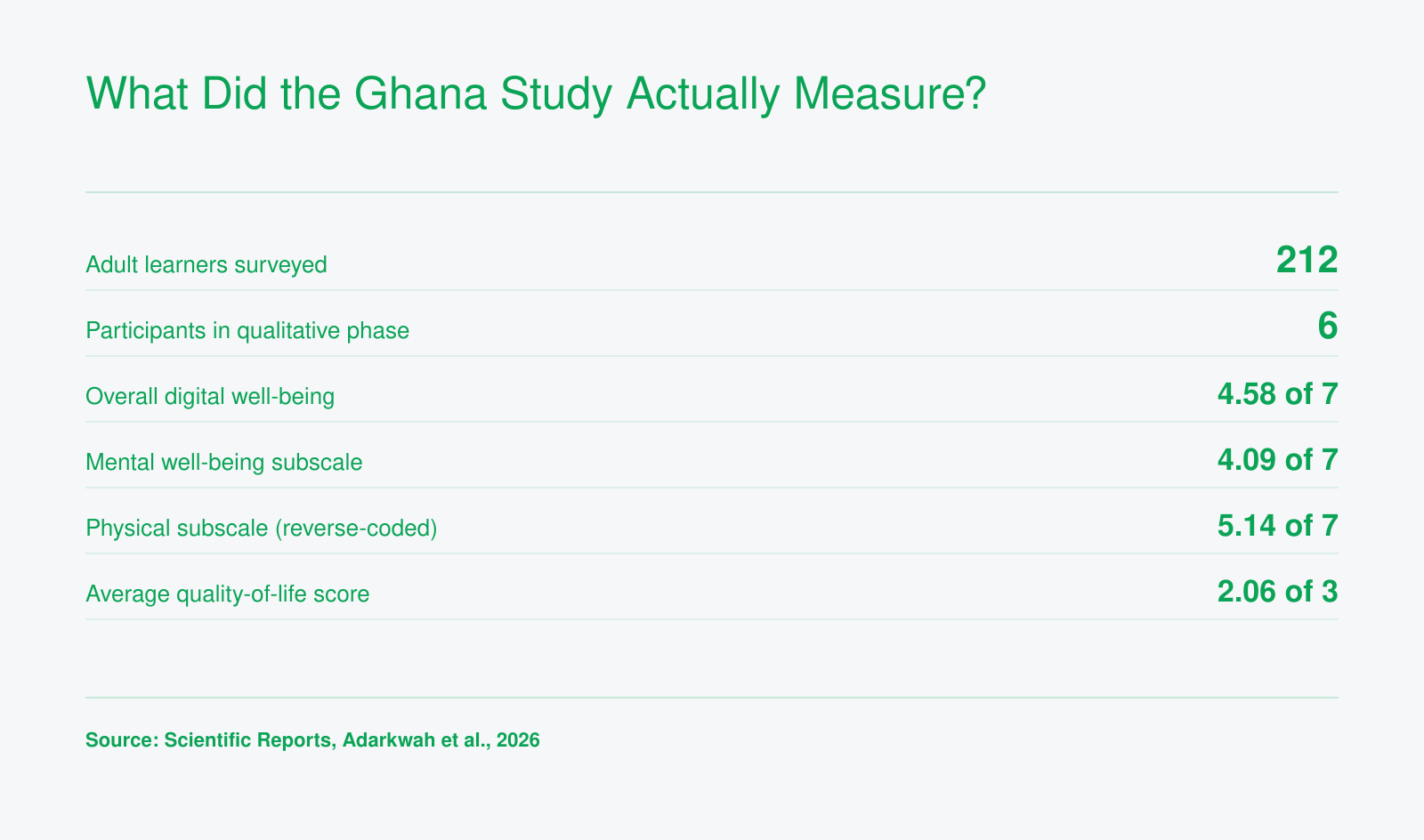
The Ghana Study at a Glance
These figures come from a mixed-methods study of adult learners at a single university in Ghana, published November 6, 2026 in Scientific Reports. Digital well-being scores landed above the scale midpoint, and quality-of-life gains were modest. The in-depth storytelling findings rest on just six participants, so treat them as a signal for U.S. returning students rather than a verdict.
Four Coping Practices That Keep AI Helping Instead of Hurting
The debate over AI in college is shifting from whether students should use it to how they can use it without losing sleep, calm, and confidence. The Ghana study of adult learners published in Scientific Reports in November 2026 identified four coping strategies participants relied on: developing critical distance and self-awareness, re-engaging human connection and support networks, mindful regulation and intentional use, and transforming frustration into learning. Each one turns into a habit you can fit into an ordinary week.
Build a Weekly Routine Around the Four Practices
- Critical distance: Treat every AI answer as a draft claim. Before it goes into your notes or an assignment, check it against your textbook, lecture slides, or a library source.
- Human support networks: Schedule at least one human touchpoint each week, such as a study group, a tutoring center session, office hours, or an advisor check-in. AI can explain a concept at midnight, but it cannot notice when you are falling behind.
- Mindful limits: Decide in advance what you will use AI for (outlining, self-quizzing, clarifying a dense reading) and for how long.
- Frustration into learning: When an answer confuses or misleads you, treat that moment as a study prompt rather than a reason to quit.
Set Guardrails That Protect Your Body
The same study found that a notable minority of respondents reported disturbed sleep, changes in eating habits, physical discomfort, and less exercise tied to generative AI use. Simple rules help. A no-AI-after-10pm cutoff keeps late-night prompting from eating into sleep before a workday. During long weekend study blocks, set a timer for a short walk every hour and keep meals on schedule instead of snacking at the keyboard.
Turn a Bad Answer Into a Learning Move
Say a chatbot gives you a statistics solution that doesn't match the answer key. Ask it to explain its reasoning step by step, find where the logic breaks, then close the chat and re-solve the problem yourself on paper. You come away understanding the method instead of copying an output, which is what your instructor is grading anyway.
Treat Guardrails as Completion Strategy
For a returning student, lost sleep or isolation is not a side issue. It is how semesters slip away. The study's authors recommend that adult educators prioritize learners' digital safety, so raising these needs is reasonable. Ask your advisor what tutoring, counseling, or tech-support resources your program offers, and say so if AI use is crowding out rest or human contact. Getting support early is far easier than restarting a stalled degree.
The question is not whether to use AI. It is whether you use it intentionally, with clear limits and enough critical distance that your degree still reflects your own thinking.
degreecompletion.com